How to Update Your Citizen ID to Tax Identification Number on eTax Mobile
Date: 2025.07.01
Starting from July 1, 2025, the personal identification number (12-digit Citizen ID or National ID code) will officially replace tax codes for individuals, households, and household businesses nationwide.
This aims to synchronize tax system data with the National Population Database, increase transparency, and reduce administrative procedures.
🛠 Step-by-Step Guide on eTax Mobile
Step 1: Log in to the eTax Mobile app → Select: Tax Registration → Update Information
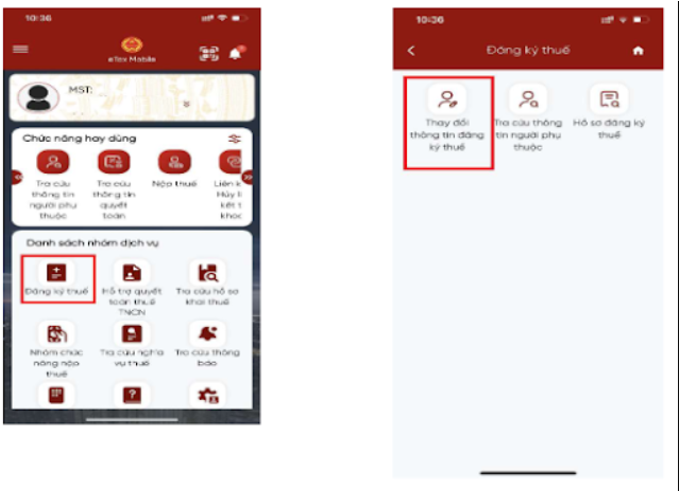
Step 2: The interface will display your information:
– Name and Date of Birth are editable
– Old document numbers cannot be edited
– New document number: You are allowed to input your Citizen ID (CCCD)
– Enter the CCCD or National ID code and click Fetch Citizen Information to cross-check with the National Database

Step 3: The screen displays:
– If information is not found: The system will instruct you to contact the police to update your population records
– If the citizen information is found: It will display both the old and new tax registration info → Choose the tax authority based on your residence (permanent/temporary) and mark any changes if needed
Step 4: Select the fields you want to update such as ID card, phone number, email… and fill in the details (issue date, place of issue, phone number, email), then click Continue

Step 5: After clicking Complete Declaration, you will see Form 08‑MST

Step 6: You may share the PDF and attach related documents (photos, files) through the app.
Then click Complete, receive an OTP, and send the application.
Step 7: You can choose: Skip (not send) or Agree (send). After agreeing, the system will notify: “Your application has been successfully submitted” and you will need to wait for processing.
📌 Source: Thu vien phap luat (Legal Document Library)

✅ Important Notes
– Review all old and new information carefully before submitting.
– Once your information matches and is confirmed by the tax authority, your Citizen ID will officially replace your tax code and be used for all tax-related transactions.
– The transition does not affect previously issued tax documents – they will remain legally valid.
– If the information does not match, your tax code will be marked as “pending update” and you must complete the process to continue using it normally.
Related news
-

Does Renting Out a Property with Annual Revenue Below VND 1 Billion Require Tax Filing? Tax Declaration Rules from 2026
From January 1, 2026, individuals engaged in real estate rental activities with annual revenue of VND 1 billion or less...
-
Corporate Income Tax Exemption 2026: 3-Year Tax Exemption for Newly Established SMEs and Businesses with Annual Revenue of VND 1 Billion or Less
1. Legal Basis The Corporate Income Tax exemption policy applicable in 2026 is governed by the following legal documents: Resolution...
-

Official Abolition of the Business License Tax Effective January 1, 2026
From January 1, 2026, a major change in tax and fee policy officially takes effect: the complete abolition of the...
-

Personal Income Tax Law 2025: Exemption of Overtime Pay, Night Shift Allowances, and Unused Annual Leave Payments from 2026
🔔 From 2026: Overtime Pay, Night Shift Pay, and Unused Annual Leave Payments Are Exempt from Personal Income Tax –...
-

Accounting for Gifted Goods: Essential Tax Regulations Businesses Must Know
In the course of business operations, gifting goods to customers, partners, or employees is a very common practice: customer appreciation,...
-

Updated Personal Income Tax Calculation for 2026 Under the New Family Deduction Scheme
On December 10, 2025, the National Assembly officially passed the amended Personal Income Tax (PIT) Law. One of the key...


